找回密碼
 新用戶註冊
搜索
熱搜: hifi av 音樂
樓主: hols

[CAS] 最超值的CAS器材 $300的 tplink travel router

[複製鏈接]
發表於 2026-1-20 12:08:31 | 顯示全部樓層
lklok825 發表於 2026-1-17 12:55
請問樓主Hols 師兄tplink 後面是如何setup? 畢竟算是小投資,小弟都有興趣玩下呢個travel router

小弟本身 ...

明晚直播會講下依隻TPLINK點玩?
回復

使用道具 舉報

發表於 2026-1-21 01:33:16 | 顯示全部樓層
hols 發表於 2026-1-19 00:04
我用Taiko Olympus as Roon server及 Taiko Router + taiko switch 接駁有些不同。taiko router 會發出很 ...

想請問一下,按照你而家的配置,整條鏈路是如何的呢?Taiko Router + taiko switch係直接取消左,替換成TPLINK 902直連SERVER。定係話先Taiko Router + taiko switch->WIFI ROUTER出WIFI 信號,然後TPLINK 902連WIFI ROUTER的信號,直連SERVER呢?
回復

使用道具 舉報

 樓主| 發表於 2026-1-21 11:24:55 | 顯示全部樓層
hun009 發表於 2026-1-21 01:33
想請問一下,按照你而家的配置,整條鏈路是如何的呢?Taiko Router + taiko switch係直接取消左,替換成T ...

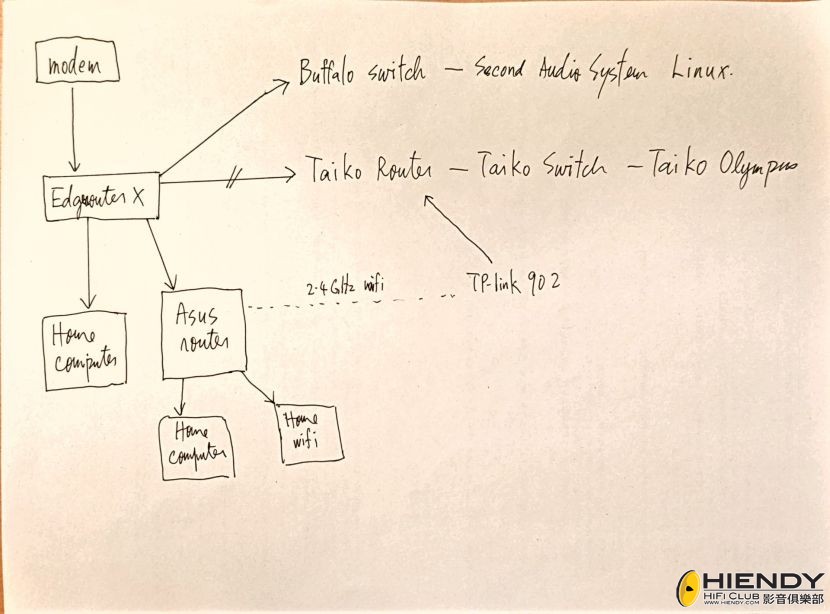
我现在的network diagram如下:

Modem-->Edgrouter X(no wifi)-->Asus router(wifi)--> TPlink 902-->Taiko Router--> Taiko Switch--> Taiko Olympus server

WBF 的Taiko Router 和Taiko switch用家門比較過全部都認為保留Taiko router和switch 更好。可能因為Taiko做了一些優化由Taiko Router switch和Taiko network card的流程令干擾達至極低。
回復

使用道具 舉報

發表於 2026-1-21 11:48:02 | 顯示全部樓層
hols 發表於 2026-1-21 11:24
我现在的network diagram如下:

Modem-->Edgrouter X(no wifi)-->Asus router(wifi)--> TPlink 902-->Tai ...

嘩. 行咁多隻ROUTER
回復

使用道具 舉報

 樓主| 發表於 2026-1-22 00:21:54 | 顯示全部樓層
racewong 發表於 2026-1-21 11:48
嘩. 行咁多隻ROUTER

用network diagram 看可能會清楚些。我的network 接法也有很多CAS發燒友採用。是盡量將音響部分和家用電腦部分分開的接法。Wifi 因是認為容易引起干擾所以會放在家用部分Asus router。Primary router  Edgerouter X不負責wifi.  現在加入TPlink 902又重新將Asus 和 Taiko 連接但TPlink 902 client mode作為wifi bridge 引起干擾不大所以音效有改進。
network diagram.jpg
回復

使用道具 舉報

發表於 2026-1-22 22:02:51 | 顯示全部樓層
网上其他人分享给我的设定:

Setup WR902AC:
1. Look at the back of the unit. It should say the name of the device Wifi.
2. Power up the unit using the 5V micro USB. Give it a minute.
3. On a computer select the 2.4Ghz Wifi from the TPLink. Type in the password, this is on the back label on step #1.
4. Once you’re connected, go to http://tplinkwifi.net
(If this step does not work use a fresh browser after deleting the cache)
5. The first time it will force you to set a new admin password.
6. Once you’re in the menu, cancel the quick setup.
7. On the left bar go to the Wireless 5Ghz. Turn off this radio.
8. Go to USB settings. Under Storage Sharing and FTP Server tabs disable both.
9. Go to System Tools, Time Settings, and click on Daylight Savings, Save, Get time from PC, Save. Close the browser.
10. Unplug the power from the TPLink.
11. On the left side of the device move the physical toggle down to CLIENT.
12. Reattach the power. Select the TPLink wifi again and connect.
13. Open the browser again and go back to TPLinkwifi.net
14. Go to Quick Setup. Click Next. Now select CLIENT. Next.
15. There should be a list of your home’s 2.4Gz wifi channels. Select your Wifi with the highest signal strength. On the next screen it will ask for your Wifi password. Click Next, then Next.
16. At the end of the setup it will ask you to click FINISH. Then the device will reset. This will take 2 minutes.
17. At this point the TPLInk Wifi ID will disappear from your computer’s Wifi list. The TPLink is now an extension of your home Wifi. If you connect your computer to the TPLink via LAN it will be an ethernet hotspot (turn off your computer’s Wifi first!). Run a test by opening a browser and you should have normal internet access.
18. You’re all set up! Connect the TPLink to your music server using a dedicated low-noise battery and enjoy! (make sure the battery pack is detached from any charging AC!)
回復

使用道具 舉報

發表於 2026-1-23 00:36:51 | 顯示全部樓層
hols 發表於 2026-1-22 00:21
用network diagram 看可能會清楚些。我的network 接法也有很多CAS發燒友採用。是盡量將音響部分和家用電 ...

收到!多謝分享!
回復

使用道具 舉報

發表於 2026-1-23 00:40:59 | 顯示全部樓層
Zein 發表於 2026-1-22 22:02
网上其他人分享给我的设定:

Setup WR902AC:

如果淨係用 2.4Ghz WiFi,可能直接買冇 5Ghz WiFi 的 WR802N 會更好?
回復

使用道具 舉報

發表於 2026-1-23 08:03:10 | 顯示全部樓層
kelvinhin 發表於 2026-1-23 00:40
如果淨係用 2.4Ghz WiFi,可能直接買冇 5Ghz WiFi 的 WR802N 會更好?

这个也有可能。但是我没有继续研究下去,而且也不能确定两个firmware一样嘛。
回復

使用道具 舉報

發表於 2026-1-23 08:21:08 | 顯示全部樓層
本帖最後由 Zein 於 2026-1-23 08:34 編輯

只是想分享我个人试过的经验。

那时我试了这个tp link半个小时,之后就没继续用了。主要原因是音乐密度和细节减少了,弊多与利。每个人情况不一样,可能会有分别。

继续简单介绍一下我的情况分享给大家:
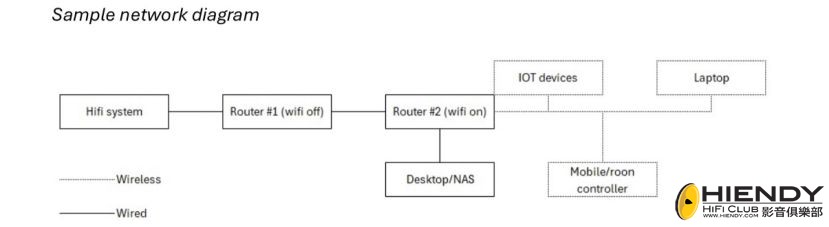
1) WiFi图案如下面:用了两个Asus router,光纤进屋之后router #1 (全部WiFi 功能关掉).hifi network switch 接入router #1, router #2接入router #1而且兼任工作室的network switch和全屋的access point.
2) Router #1-我有改变很多软件设定例如减少network address sub pool, setup static ip assignment, vlan.其实router很多设定要改的,才能让串流发挥最好的效果。
3) hifi系统那里,是几乎没有我家里的wifi signal的,因为想减少污染的机会所以我故意放远access point远一点
4) router有用lps来供电而且整个网路用aim 和 way cable network线

我是在新加坡工作玩音响的,刚好这个星期在香港探亲,如果有人可以让我家访或者交流串流心得,可以pm我
IMG_0330.jpeg

評分

2

查看全部評分

回復

使用道具 舉報

 樓主| 發表於 2026-1-23 14:34:52 | 顯示全部樓層
kelvinhin 發表於 2026-1-23 00:40
如果淨係用 2.4Ghz WiFi,可能直接買冇 5Ghz WiFi 的 WR802N 會更好?

WBF 的 網友試過比較902 和802分别不大.但902 的底板可以摩到直入3.3v  bypass 底板的一粒switching regulator 而且可以用IanCanada 最新的3.3v mini pro lifePo4 電池.效果提升兩班.
回復

使用道具 舉報

發表於 2026-1-24 11:42:46 | 顯示全部樓層
hols 發表於 2026-1-23 14:34
WBF 的 網友試過比較902 和802分别不大.但902 的底板可以摩到直入3.3v  bypass 底板的一粒switching regu ...

我都諗住買隻902玩下.
回復

使用道具 舉報

發表於 2026-1-24 22:54:26 | 顯示全部樓層
唔使諗啦,買啦
謝謝hols師兄分享,真係好嘢嚟,所費無幾

個電源power對902都幾大影響,開頭用15W小米電源,啲聲真係好靜但係冇釐神氣,腳軟軟咁,當轉用33W都係小米電源,啲聲生猛番晒。
回復

使用道具 舉報

發表於 2026-1-25 12:04:17 | 顯示全部樓層
我尚未試加多這個TPlink 902,我早一個星期Ipad用apple lightning 配條6 meter長嘅MPS Arthur lan 線接上Switch,不用wifi做remote, server 也用lan 線去switch,完全擺脫wifi,已經非常滿意,wifi完全係hifi殺手!
回復

使用道具 舉報

發表於 2026-1-25 12:19:38 | 顯示全部樓層
kelvinhin 發表於 2026-1-23 00:40
如果淨係用 2.4Ghz WiFi,可能直接買冇 5Ghz WiFi 的 WR802N 會更好?

WR802N 都可以改為直接餵 DC 3.3V 俾佢,不過就比較大工程咁解:

https://ethernet-sound.com/forums/topic/tp-link-tl-wr902ac/page/22/#post-5408

港島就灣仔 298:

https://www.reddit.com/r/HongKong/comments/1lcgofh/comment/myqmupq/

九龍就可以去荔枝角:

https://www.facebook.com/Hercules.Workshop/videos/1115228375716629
https://www.facebook.com/Hercules.Workshop/about


問題係太多家電同埋影音器材同樣係需要用到 2.4 GHz:

https://handwiki.org/wiki/Engineering:List_of_2.4_GHz_radio_use

音質方面除咗供電十分重要,如果 2.4 GHz 嘅干擾比較勁嘅話就隨時變得無咁靚聲,況且音質個關鍵其實係要搞掂個 OpenWrt 之後再將 Wi-Fi transmit power 個數值盡量減到有咁低得咁低。

富貴人家住緊遠離煩囂嘅獨立屋就另計,平民百姓嘅蝸居就真係爭崩頭,自己住緊個單位再加埋隔離鄰舍嘅干擾都幾和味:

https://www.whatsbestforum.com/goto/post?id=1106569


當然識得諗計嘅話又未嘗不可,正所謂一不做二不休,既然改咗供電嘅話就不妨玩埋天線:

https://ethernet-sound.com/forums/topic/tp-link-tl-wr902ac/page/22/#post-5413
I’m case you meant Bosko, then yes, I use an external directional antenna for the 902ac. It gives around a 10db boost. Actually, I am testing a new orientation and the 902ac antenna power is set to zero dB.
https://www.whatsbestforum.com/goto/post?id=1106701
0dBm is 1 milliwatt.
10dBm is 10 milliwatt (10dB above 1 milliwatt)
-10dBm is 0.1 milliwatt (10dB below 1 milliwatt)
再進一步嘅話就係玩 Faraday fabrics:

https://interestingengineering.com/innovation/novel-faraday-fabric-blocks-nearly-all-electromagnetic-waves-says-study


成家人一齊 share 隻普通嘅 router 就當然無可能咁搞法,但係搵隻獨立嘅 router 嚟玩就唔同講法,德國 Eric 師兄推崇嘅 air gap 呢一個重點可以靠 WR902AC 起雙飛,就算搵塊嘢冚住咗兩件 WR902AC 都未必會影響到入面 Wi-Fi 嘅運作。


不過改完 WR902AC 一大餐之後嘅反思就係,當妹仔大過主人婆嘅時候仲有無性價比可言呢?有部份外國嘅師兄已經試過一件平平無奇嘅 D-Link DGS-105 switch 加埋隻尿袋已經贏到原汁原味嘅 WR902AC,咁嘅情況就不如平平哋整一件唔需要改任何嘢嘅 OCXO 級數 switch 仲無咁煩:

https://item.taobao.com/item.htm?id=820091795023
https://www.aliexpress.com/item/1005010710138409.html
https://pingjia.taobao.com/dkZUVVQ1eGo1NTZoYlc2dEdSYWlmZz09.html

假如 Wi-Fi 勁得滯嘅話就會影響到其他器材,隨時偷雞唔到蝕渣米嘅話就認真係嘥氣:

https://www.whatsbestforum.com/goto/post?id=1105554
In my experience, putting a high-power Wi-Fi access point close to an audio system tends to do two things:

1) It can introduce a noticeable “glare” up top. Whether you hear it depends on the system and your sensitivity, but even when it’s subtle it often translates into (faster onset of) listening fatigue.

2) More controversially, it can expand the perceived soundstage and make things sound more “airy”.

You usually notice (2) first. That can create an initial “wow”, but once (1) follows, you’ll often be quick to revert.

You’re in the luxurious position of having no close neighbours, so this is one of the rare cases where you might actually be able to benefit from this. Most people are swimming in neighbouring Wi-Fi; for them this can be a futile exercise.

評分

2

查看全部評分

回復

使用道具 舉報

發表於 2026-4-27 04:43:35 | 顯示全部樓層
QSA-Lanedri 都有 router,Mikrotik hEX 並無 Wi-Fi,所以就無後顧之憂:

https://www.whatsbestforum.com/goto/post?id=1124458

另外 Eric 試咗件 RME Audio USB DAC,證實 OpenWrt 真係得:

https://ethernet-sound.com/forums/topic/tp-link-tl-wr902ac/page/33/#post-5695

配合埋呢個功能,理論上應該可以利用 QSA-Lanedri 嘅力量去洗水再洗水無限 loop:

https://www.whatsbestforum.com/Whats-Best-Forum-QSA-Lanedri-Special-2023.html
Prepare for a musical revelation that defies the law of diminishing returns.
https://www.headphoneclub.com/thread-773833-1-1.html
值得一提的是,这套设备不仅仅实现隔离主机的功能,B机的USB口支持插入U盘,当播放网络音频的时候,可以将音乐以WAV的无损格式直接储存到U盘中,并且可以实现自动分曲储存。]值得一提的是,这套设备不仅仅实现隔离主机的功能,B机的USB口支持插入U盘,当播放网络音频的时候,可以将音乐以WAV的无损格式直接储存到U盘中,并且可以实现自动分曲储存。
回復

使用道具 舉報

您需要登錄後才可以回帖 登錄 | 新用戶註冊

本版積分規則

Archiver|小黑屋|聯絡我們|刊登廣告|Hiendy.com 影音俱樂部 一個屬於音響愛好者的家

GMT+8, 2026-5-24 15:46 , Processed in 0.036599 second(s), 16 queries .

Powered by Discuz! X3.5

© 2001-2024 Discuz! Team.

快速回復 返回頂部 返回列表