Sell your old CD player and enjoy Bit-Perfect audio on Linux!
Besides Voyage MPD, VortexBox, the third choice - AP Linux!
Just make sure you have the Linux driver for your external DAC first
so far below three should okay
-KingRex UD384 async-USB DAC
-M2TECH hiFace EVO
-Mytek Stereo192-DSD-DAC should be able to connect using FireWire
The installation is very easy, all done by user interface, you only have to call command prompt once to type in a simple command...
iso image download here, 1.3G -
dl.ap-linux.com/Releases/AP-Linux-1.0.2-i386-custom.iso
setup the audio player-
http://www.ap-linux.com/documentation/playing-audio/
FAQ, just take a look for #3 and #5-
http://www.ap-linux.com/documentation/faq/
---
some more tips-
-timezone uses Asia/Hong_Kong
-to install using USB disk without burning the iso to disc, download the Universal USB installer, details here-
http://www.ocztechnologyforum.com/forum/showthread.php?105168-NEW!!-OCZ-Bootable-Toolbox-PC-Edition-%28REBUILD%29
go to the above address and search for <Installing the ISO to a USB stick> in your browser, and then follow the steps there (of course use the downloaded Linux iso image)
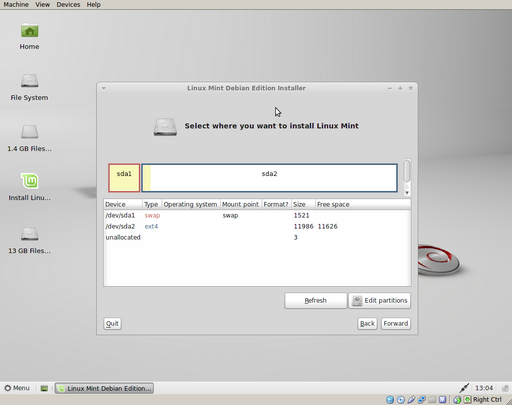
-I will delete all partitions on my drive for easy installation, press the <Edit partitions> to open another window, use the #2 button from the top toolbar to delete, then use the last button to apply the delete action. To create, use the #1 button, use the default values, then use the last button to apply the create action. When done, press the <x> on the top right-most corner of the Edit partition window to close it



 IP卡
IP卡 狗仔卡
狗仔卡
 發表於 2013-4-12 18:29:08





 提升卡
提升卡 置頂卡
置頂卡 沉默卡
沉默卡 喧囂卡
喧囂卡 變色卡
變色卡 顯身卡
顯身卡
 Thanks for sharing!


